![Tyler Rigg]()
Written by Tyler Rigg
Updated August 2026
Multicolor 3D printers make it easier to create detailed, ready-to-display models without stopping to swap filament by hand.
We compared print speed, build volume, automation, enclosure design, and ease of setup to find strong options for beginners, hobbyists, and high-volume makers.
Ready to buy now? Shop the best:
Editors' Top Picks
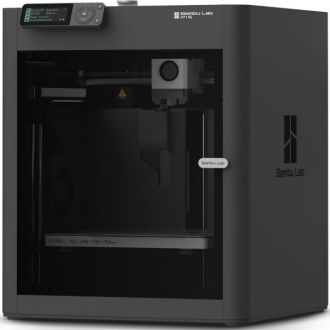
Dimensions: 18.72"D x 20.67"W x 18.72"H | Material: Plastic Filament | Weight: 39 pounds | Reduction Ratio: 1:0
The Bambu Lab P1S is a solid choice if you want a fast, enclosed FDM printer that doesn’t need much babysitting. It’s a good fit for hobbyists and small workshop users who care more about dependable prints than spending weekends tweaking hardware. Setup takes about 15 minutes; it has automatic bed leveling, and the 500 mm/s print speed helps it get from box to first print quickly. The enclosure also opens the door to tougher materials, so it can handle ABS and ASA better than a typical open-frame budget printer.
The main catch is that it’s not the cheapest or most basic way to get into 3D printing, and multi-color printing means buying the separate AMS system. At 38.9 pounds, it’s also not something you’ll want to move around much, so it needs a dedicated spot on a desk or bench. Beginners on a tight budget may find it more machine than they need, while advanced users might want more room to expand. Nonetheless, it’s an easy one to recommend if speed, convenience, and enclosed printing matter most.
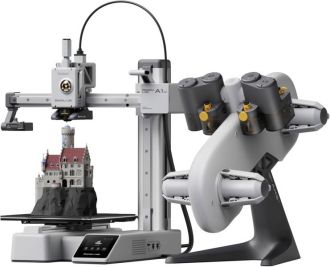
Dimensions: 16.77"D x 14.82"W x 19.5"H | Material: Metal | Weight: 22 pounds | Reduction Ratio: 1:0 | Noise Level: 48 dB
The Bambu Lab A1 Mini Combo is a smart choice for hobbyists who want fast, low-hassle 3D printing in a compact machine, especially if multi-color projects are part of the plan. It comes mostly assembled, does full auto calibration, and includes the AMS lite for multi-color printing, so setup doesn’t feel like a project on its own. The 10,000 mm/s² acceleration and active flow rate compensation offer the kind of speed and consistency that matter when you print often. It’s also fairly quiet, topping out at 48 dB, which makes it easier to live with in a home workspace.
It's a better value if you’ll actually use the color-printing features, since the combo includes extra capability you may not need otherwise. It's a strong pick for beginners, tinkerers, and anyone who cares more about convenience than maximum build area.
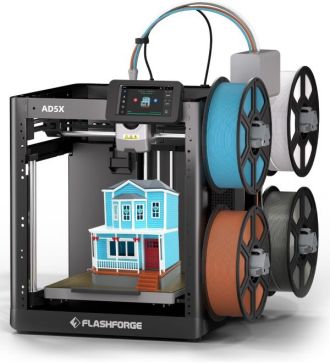
Dimensions: 14.3"D x 16.3"W x 14.8"H | Material: Metal | Weight: 24.29 pounds | Reduction Ratio: 1:0
The FLASHFORGE AD5X makes the most sense for hobbyists and small creators who want multi-color printing without moving up to a full pro machine. Its four-color IFS system can handle filament changes automatically, which is a big help if you don’t want to stop and swap materials mid-print. Fully auto leveling takes some of the hassle out of setup, and the 220 × 220 × 220 mm build volume keeps it compact while still giving you room for useful projects. The all-metal Core XY frame and speeds up to 600 mm/s make it a solid fit for fast desktop printing.
The tradeoff is that multi-color convenience usually brings more complexity than a basic single-extruder printer. Expect a learning curve, some waste during color changes, and a bit of setup and tuning to keep things running smoothly. It’s a better buy for makers who’ll actually use the extra color capability than for someone who just wants a simple starter machine. Even so, the 300°C nozzle, TPU support, and sturdy metal build give it enough flexibility to make it worth checking out for those serious about 3D printing.
Dimensions: 16.9"D x 16.5"W x 21"H | Material: Metal | Weight: 65.9 pounds | Reduction Ratio: 1:0
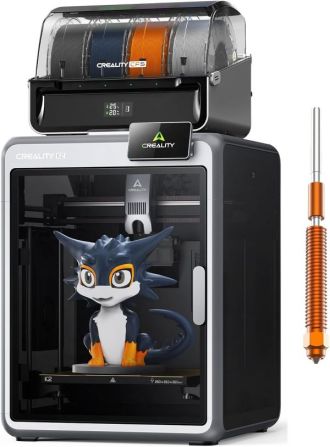
The Creality K2 Combo is a strong pick for hobbyists or small shops that want speed, automation, and multicolor printing without a long setup process. It’s a large, mostly preassembled printer with a 260 × 260 × 260 mm build area, 600 mm/s rated speed, smart auto-leveling, and an AI camera for monitoring prints. That mix makes it appealing if you want less tinkering and more actual printing. The included CFS support is another real bonus, since it lets you do multicolor jobs without having to hand-paint parts later.
The main downside is that it’s a heavy, fairly serious machine, not a casual plug-in-and-forget option. At 65.9 pounds, it needs a dedicated space, and the feature set only really pays off if you’ll use the automation and color printing often. It’s also priced in the midrange, so people who only need basic single-color prints may not get enough out of the extras. Still, it’s worth considering if you want a capable, modern printer that goes beyond the basics.
Dimensions: 24"D x 22"W x 36"H | Material: Metal | Weight: 70.54 pounds | Reduction Ratio: 1:0
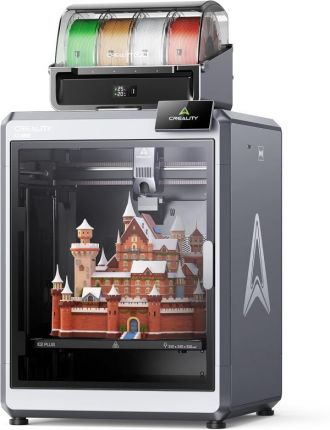
This is a solid pick for makers who want a big, capable 3D printer that can handle multicolor jobs without a lot of extra work. The K2 Plus Combo gives you a 350 x 350 x 350 mm build volume, a 600 mm/s top speed, and the CFS system for up to 16 colors, which is handy if you’d rather skip painting models later. It also has full auto-leveling, dual AI cameras, and a heated chamber, so it’s set up for tougher materials like ASA and PPA as well as larger prints.
The catch is that it’s not a simple beginner machine, and its size makes that obvious. At 70.4 pounds and nearly three feet tall, it needs real space, and the multicolor setup adds cost and some extra setup to manage. This is best for people who’ll actually use the automation, chamber heating, and color mixing, not just print basic PLA.
Features to Consider
Multicolor Filament System
Automatic filament systems let a printer switch colors or materials without constant manual changes. Compare how many spools the system supports, whether additional units can expand the color count and how much filament is purged during each change.
Build Volume
Build volume determines the largest object you can print in one piece. A larger print area is useful for helmets, props and batches of smaller parts, while a compact printer is easier to fit into a home office or workshop.
Print Speed and Acceleration
Maximum print speed is only part of the performance picture. A rigid frame, strong acceleration, reliable flow control and well-tuned software help a printer maintain quality when it is running quickly.
Enclosure and Material Compatibility
An enclosed build chamber helps control temperature and reduces warping with materials such as ABS and ASA. Also check the maximum nozzle temperature, heated-bed capability and manufacturer-approved filament types if you plan to use engineering-grade materials.
Automatic Calibration and Monitoring
Automatic bed leveling, flow calibration and first-layer checks reduce setup time and failed prints. Cameras and error-detection features can also help you monitor long jobs without staying beside the printer.
Maintenance and Everyday Use
Look for easy nozzle access, straightforward filament loading and readily available replacement parts. Clear software, dependable wireless connectivity and manageable noise levels can make a major difference when the printer is used frequently.
How We Analyzed
We began by comparing multicolor 3D printers from established brands and reviewing build volume, advertised print speed, supported materials, nozzle and chamber temperatures, filament-management systems, calibration features, monitoring tools, space requirements, and assembly requirements.
We then examined independent expert coverage and recurring themes in customer feedback to identify common strengths and concerns involving setup, print consistency, software, maintenance, noise, and support. Repeated observations carried more weight in our assessment than isolated comments.
Finally, we weighed capability against price and matched the leading options to different buyer needs, including reliable enclosed printing, compact value, built-in multicolor operation, high-volume enclosed printing, and large-format projects. The five selected products each offer a distinct balance of features and address a different priority for multicolor printing.
FAQ
Q. What should I look for if I want multicolor printing without a lot of manual swapping?
A. Look for a printer with an automatic filament handling system, since that reduces pauses and mistakes during color changes. For example, the FLASHFORGE AD5X uses a four-color IFS system, while the Bambu Lab A1 Mini Combo includes AMS lite for easier color changes. Both are better fits if you want color printing to feel automated rather than hands-on.
Q. How important is build volume when choosing a 3D printer?
A. Build volume matters most if you plan to print helmets, large props, or multiple parts in one run. The Creality K2 Plus Combo gives you much more room than compact desktop models, while the regular Creality K2 Combo is still sizable but easier to place on a desk. Bigger machines are more flexible, but they also need more space and a stronger setup area.
Q. Do enclosed printers make a real difference for material compatibility?
A. Yes, an enclosure helps stabilize temperature and can improve results with materials that warp more easily. The Bambu Lab P1S is a good example, since its enclosed design makes it better suited for ABS and ASA than many open-frame printers. If you mainly print standard PLA, you may not need that extra thermal control, but it becomes valuable as you move into tougher filaments.